PinFreshly generates your pins across every layout and colour palette automatically — so you never have to make the same pin twice.
Real pins generated from a single blog post using PinFreshly
Pinterest strategy, built in
Not just more pins — a Pinterest content strategy
Most pin generators make five pins that say the same thing with different colours. PinFreshly detects your blog's niche and selects the angles most likely to perform — so every pin from the same post targets a different searcher.
1
Niche detection — PinFreshly identifies your blog niche automatically from your content, or you can set it manually.
2
Angle selection — picks the highest-performing angles for your niche: problem/solution, curiosity gap, listicle, contrarian, and more.
3
Entity consistency — every pin locks one primary search entity and echoes it across the title, description, and board name — the way Pinterest's algorithm rewards.
Each pin targets a different searcher. Each one links back to the same post. That's a content strategy — generated in seconds.
Angles generated from one blog post
Problem / SolutionFor the frustrated reader
Curiosity GapStops the scroll
ListicleDrives saves
ContrarianEarns reach
Outcome / TransformAspiration + desire
Beginner AccessibilityDiscovery traffic
Authority / DataLong-term distribution
Time BoundedClick-through hook
Niche-weighted — a food blog gets different angles than a finance blog.
Pinterest integration
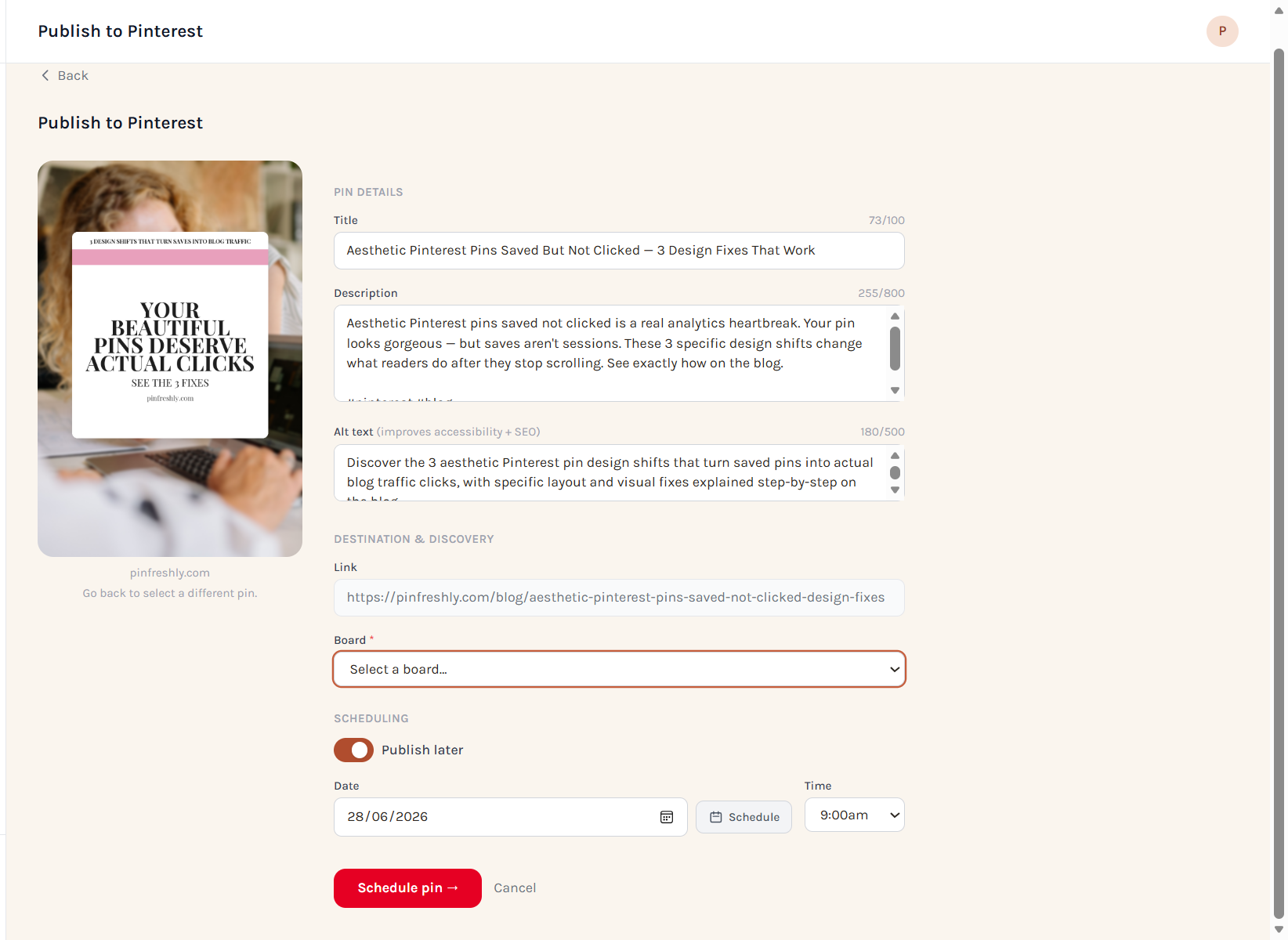
Publish to Pinterest without leaving PinFreshly
Connect your Pinterest account once. Then publish any pin directly to a board,
or schedule it for a date and time — all inside the app. Your pin queue,
your pacing, no third-party tools needed.
✓ Publish now or schedule for any date and time
✓ Choose your board from your connected Pinterest account
On the free plan you get all 6 Classic layouts and 50 pins/month. Upgrade to Pro and unlock 50 layouts
across 8 themes — so you can pick your favourite or schedule all of them.
Pick your dates, boards and how many pins a day. Auto-Schedule turns your blog posts into pins and schedules them all, then repeats every few weeks if you want — no daily posting, no designing.
✓Colour-coded calendar shows which days still need pins
✓Rotates your posts, boards and layouts so nothing is over-pinned
✓Edit any scheduled pin from your calendar before it publishes
✓Repeat it every few weeks, so your boards stay fed without you
Any blog with an RSS feed — WordPress, Ghost, Substack, Squarespace, Wix, Blogger, and more. Paste your feed URL and PinFreshly fetches your posts automatically. If your blog has an RSS feed, it works.
Does PinFreshly work with Etsy shops?
Yes. Connect your Etsy shop's listings feed and PinFreshly turns your product listings into Pinterest pins the same way it does blog posts — AI-written copy, your choice of layout and palette, ready to publish or schedule.
How does PinFreshly connect to my Etsy shop's feed?
Etsy doesn't publish an official RSS feed for shops, but every shop has an unsupported listings feed PinFreshly can read. It shows your shop's most recent listings at any given time, and PinFreshly builds up your available pin library from those over time. Full setup details are available after signup.
Do I need design skills to use PinFreshly?
None at all. PinFreshly generates the pin images for you — choose a layout and colour palette, hit generate, and your pins are ready. The AI writes the title, headline, description, and CTA for each pin too.
How is PinFreshly different from Tailwind or Buffer?
Tailwind and Buffer help you schedule pins you've already made. PinFreshly creates the pin images from your blog posts automatically, then lets you publish or schedule them directly to Pinterest — no separate design tool or scheduler needed.
Is PinFreshly approved by Pinterest?
Yes. PinFreshly uses Pinterest's official API and has been granted production API access by Pinterest.
How many pins can I generate on the free plan?
50 pins per month, with 6 Classic layouts and 12 colour palettes. No credit card required — ever.
Can I publish pins directly to Pinterest from PinFreshly?
Yes. Connect your Pinterest account once and publish any pin directly to a board, or schedule it for a specific date and time — all inside PinFreshly. No Buffer, no manual uploading. Available on both Free and Pro plans.
What happens to my pins if I cancel?
Your generated pins are yours to keep. Download them any time, and they stay in your account history even after cancelling.
Can PinFreshly schedule Pinterest pins automatically?
Yes. Auto-Schedule (Pro plan) generates pins from your blog and schedules them to your Pinterest boards for you. Pick a date range, how many pins you want per day and which boards to use, and PinFreshly creates and schedules the whole batch in one click. It rotates through your posts so none is over-pinned, and you can edit any scheduled pin from your calendar before it publishes. You can also set it to repeat every few weeks, ending after a number of runs or on a date. Learn how auto-scheduling works.
Is there a free trial for the Pro plan?
Yes. Pro comes with a 7-day free trial. A credit card is needed to start, but you won't be charged until the trial ends — cancel any time before then and you pay nothing. (The Free plan never needs a card.)
Does PinFreshly generate different types of pins from a single blog post?
Yes. PinFreshly detects your blog's niche and generates each pin using a different angle — problem/solution, curiosity gap, listicle, contrarian, and more. Each angle targets a different type of Pinterest searcher, so all pins from the same post compete for different keywords rather than cannibalising each other.
What blog niches does PinFreshly support?
Food, home decor, journaling, fashion, finance, parenting, DIY and crafts, travel, health and fitness, beauty, wedding, business and blogging, and gardening. PinFreshly auto-detects your niche from your content, or you can set it manually in your account settings.
Start generating Pinterest pins today
Paste your RSS feed and see what PinFreshly generates from your blog in under 2 minutes.
50 free pins every month — no credit card required.
Free plan available · No credit card · Cancel anytime
🍪 Cookie preferences
We use strictly necessary cookies to keep you signed in,
and optional analytics cookies to understand visitor
geography. No ad tracking, no profiling.
Cookie policy